
すべて
FlightFeeder Antenna Replacement
Due to a defective batch of antennas shipped in late 2014 and 2015, it is necessary that you replace your antenna for optimal operation of your FlightFeeder.
| 1FlightFeeder Antenna Kit |
Verify antenna replacement kit contents
 |
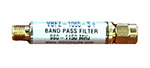
The filter is designed to optimize the ADS-B signal that the FlightFeeder receives.
 |
| 2アンテナのインストール |
- 屋外アンテナは見通しの良い場所に立てると感度が増します。できるだけ高く、航空機からの信号を遮る障害物の無い場所に設置してください。建物や木、高台などが障害物になります。アンテナは屋外に設置しますが、FlightFeederは屋内に設置してください。
- 2本の下矢印のように2個のワッシャーをしっかりと固定してください。
- 上矢印のようにナットをしっかりと締めてください。
- 下の写真で示されているように、4つの各接点を支柱の太さに合わせてしっかりと締めてください。
- アンテナを支柱にスライドさせて設置してください。
- 同軸ケーブルは厚みがあり、信号ロスを防ぎますので、曲げないでください。
- 同軸ケーブルをアンテナに接続(下の写真を参照)し、反対側をFlightFeederに接続します。


| 3Next Steps & More Information |
The coverage of your receiver should now be significantly improved. You can also view the receiver status through our ADS-B statistics portal.
We thank you for joining the FlightAware ADS-B network and remind you to contact us with any questions or comments.
